

Paul Bourdon · Founder of Poker Fish
Shall we get your next session ready together?
Message me on WhatsApp: I’ll help you install Poker Fish and configure your HUD for your next session. You can also find me on Discord.
+33 7 87 10 84 13 Contact me on WhatsApp
 Find me on Discord
Getting started with Poker Fish
Who are we?
Poker Fish is developed by a French company. Our Windows and Mac application brings together tournament results, a HUD, a hand tracker and tools to study your play after a session.
Direct link to this questionWhich French poker tracker works with Winamax on Mac and Windows?
Poker Fish is French software for Windows and macOS combining a hand Tracker, a HUD and tournament review tools. Its Tracker analyses your Winamax No Limit Hold’em hand histories for MTTs, cash games and Expresso / SNG. You can replay your hands and study your statistics. This Tracker does not support Omaha.
Direct link to this questionHow does the website differ from the application?
The website lets you view the plans and manage your account, among other things. Install the application to display the HUD on your tables, import hand histories into the Tracker, work on reviews and search for profitable tournaments.
Direct link to this questionHow do I install Poker Fish?
Create your account, download the Windows or Mac version from our website, then install and launch the application. Sign in with your Poker Fish account and follow the guide to configure your hand histories.
Direct link to this questionWhich computers are supported?
Poker Fish is available for Windows and macOS. The download page lists the versions and installation instructions. Use the version for your operating system. In the Poker Fish application, open Help > Report an Issue to submit your report.
Direct link to this questionCan I use Poker Fish for MTTs, Expresso, SNG and cash games?
The local Tracker analyses Winamax No Limit Hold’em hand histories from MTTs, cash games and Expresso / SNG. Other variants, including Omaha, are not supported by this Tracker. Public tournament results and statistics calculated from your own hand histories are different sources of information.
Direct link to this questionIs Poker Fish useful for cash games or Expresso?
The public results shown on player profiles cover MTTs recorded by Poker Fish. They do not measure cash game or Expresso results. The local Tracker separately analyses supported Winamax No Limit Hold’em hands, so it can provide playing statistics for cash games and Expresso / SNG.
Direct link to this questionWhere can I check my poker room’s software rules?
Check your poker room’s current rules for the features you use. For questions about Winamax, contact its integrity team at integrity@winamax.com.
Direct link to this questionTracker, imports and playing statistics
How do a player’s results differ from their Tracker statistics?
Results show their tournament record. In the application, the Tracker analyses hands imported from your local histories to display playing statistics such as VPIP, PFR and continuation bets. The two views use different samples.
Direct link to this questionHow do I import my hands into the Tracker?
Enable hand history saving in your poker client, then open the hand history settings in Poker Fish. Check the detected folder or select it manually. You can add other folders to import your archives. The application shows import progress.
Direct link to this questionAre new hands added automatically?
Yes. While Poker Fish is open and the source is enabled, the application monitors the history folder and imports new hands saved by the poker room. A hand missing from your files cannot contribute to the Tracker.
Direct link to this questionWhy are my Tracker statistics empty or incomplete?
Check that your histories exist in the correct folder, the source is enabled and the import has finished. Also check the date range, game filters and subscription limits. The Tracker only uses hands that have been imported and are supported. Also check that the imported hand histories match your current player name, especially if you have changed it recently.
Direct link to this questionCan I find the hands used to calculate a statistic?
For statistics with a detail view, click the value to see the observed opportunities, corresponding actions and related hands. You can also view their breakdown and graph.
Direct link to this questionHow can I filter my statistics and study a specific period?
Open the Tracker filters to choose a preset or custom period, tournaments or cash games, and stakes or buy-ins. The Tracker views use these filters.
Direct link to this questionWhat does the Tracker graph show?
It adds up winnings and losses from imported hands in big blinds. It separates the total, showdown results and non-showdown results. This graph does not represent your tournament profit in euros.
Direct link to this questionWhy does my subscription exclude some hands?
Displayed statistics follow your plan’s stake limits. When some hands exceed those limits, the application shows a message with the number of affected hands and a link to the plans. See the Subscriptions page for current limits.
Direct link to this questionWhat does reimporting local databases do?
It rebuilds the Tracker databases from your histories and available local backups. Use the reimport action in hand history settings when the application asks you to or support recommends it. Keep your history files and let the operation finish.
Direct link to this questionWhere is my Tracker data stored?
Tracker databases and backups are stored locally on your computer. The application also communicates with Poker Fish services for your account and certain features. See the privacy policy for details of the data processed.
Direct link to this questionCan I add several hand history folders?
Yes, you can add and enable several sources in hand history settings. Avoid selecting multiple copies of the same archives. Keep your hand history files before removing or reimporting a source.
Direct link to this questionHow should I interpret a statistic based on a small sample?
A statistic depends on the opportunities observed, not just the total number of hands. Open its details when available. A value calculated from a few opportunities is not enough to establish a reliable tendency.
Direct link to this questionHUD and table troubleshooting
My HUD is not showing. What should I check?
If the HUD worked before but has stopped appearing from one day to the next, restart your computer first.
Check that Poker Fish is open, signed in and configured with the correct Winamax hand history folder. Enable hand history saving in Winamax and disable its Playground mode. Wait for a hand you participate in to finish. Also check that hand history is configured for the correct Winamax player name, especially if you have recently changed it.
On Mac, check that the Winamax window and the Poker Fish window are on the same macOS desktop. Move them to the same desktop and try again. If another application also displays a HUD, temporarily close it to check whether it is causing the conflict.
If the problem persists, submit a report through Help > Report an Issue in the application, including your operating system, application version and a screenshot of the issue.
Direct link to this questionHow do I configure my HUD?
Open the HUD configurator in the application to choose which information to display. The HUD settings and available statistics let you adapt the display to the way you play.
Direct link to this questionHow do I save the fish positions?
Move the fish on the table, then click Save in the HUD controls. The layout depends on the table format. Repeat the adjustment for the different table sizes you use. The Reset button restores the initial layout.
Direct link to this question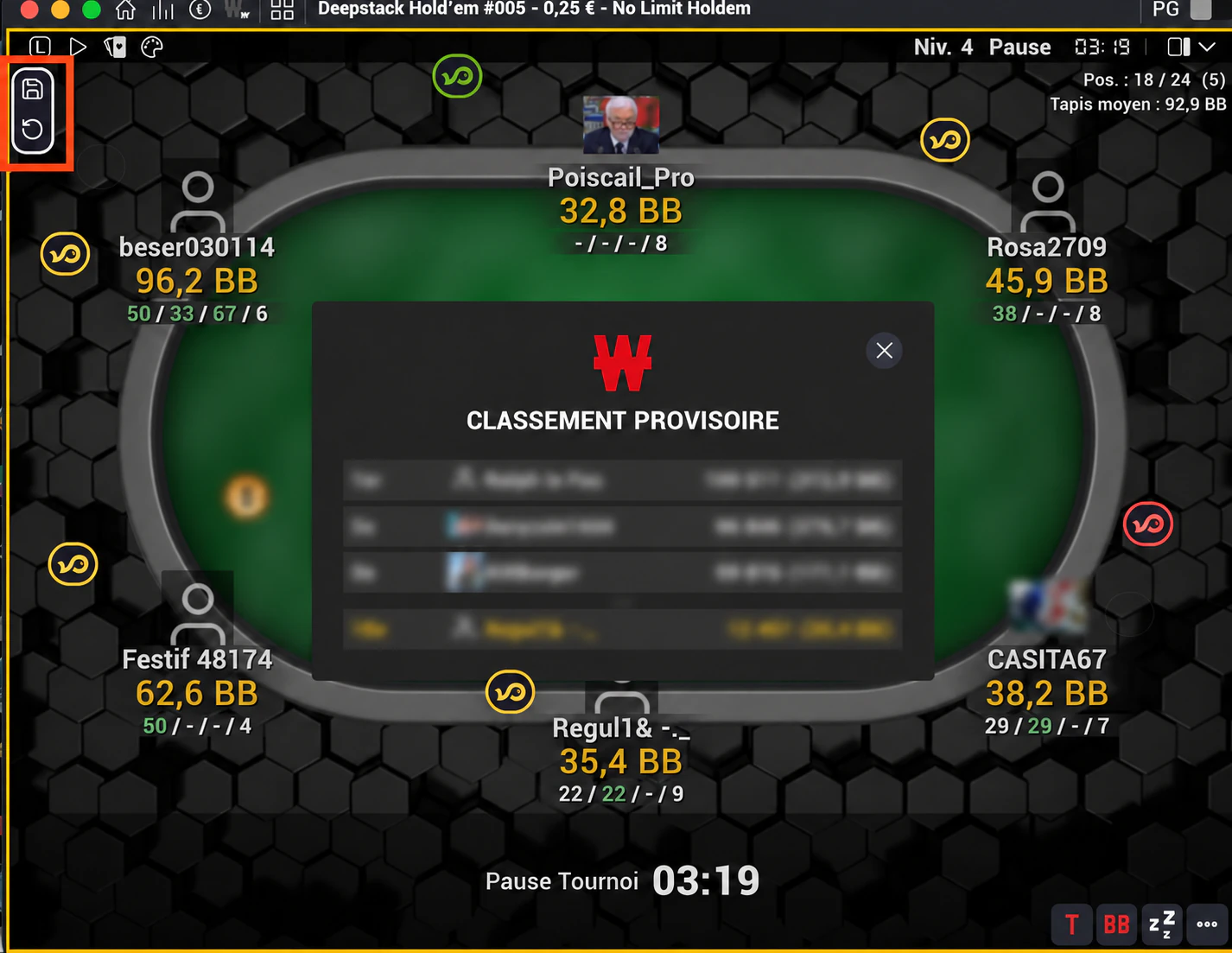
Why does the HUD still show the previous players?
After a table change, re-entry or player replacement, the HUD waits for a hand history that identifies the new table. Wait for a hand you participate in to finish. If the mismatch remains, check your hand history configuration and submit a report through Help > Report an Issue in the application.
Direct link to this questionCan I use Poker Fish with another tracker?
If another application interferes with the display, temporarily test with Poker Fish alone to identify the conflict. In the application, open Help > Report an Issue and include the name of the other application and a screenshot or recording of the issue.
Direct link to this questionWhat are automatic notes for?
They identify situations in available hands using the automatic note rules configured in the application. Open the associated hands to understand what triggered a note. They do not replace your own analysis of the context.
Direct link to this questionTournament reviews, comments and group study
How can I analyse a Winamax tournament with my coach or study group?
Poker Fish Review lets you replay a Winamax tournament, analyse hands and comment on them alone, with a coach or with a study group. The creator shares the review code to invite other participants. You can add analyses and ranges, reply to comments and choose who can see them.
The Review section is currently labelled beta in the application.
Direct link to this questionHow do I create a review of my tournament?
In Review, click Create a review, enter the tournament ID and paste its Winamax replayer link. You can find the tournament in your results. An option lets you include earlier statistics for players known to your tracker. Wait for the replayer to be prepared, then create the review.
Direct link to this questionWhere can I get the Winamax replayer link?
Copy the tournament ID, then open the Replayer page in your Winamax account. Enter the ID, retrieve the sharing link and paste it into the creation form.
Direct link to this questionCan I analyse a tournament I did not play?
Yes, the Public final tables selector offers public replayers. Selecting a table automatically fills in the tournament and replayer link.
Direct link to this questionWho can read my comments?
In the review options, choose Nobody, All participants or Selected users. This setting applies to your comments in that review. All participants also includes people who join later.
For new participants, comments are shared with all participants by default. Check this setting before writing a private analysis.
Direct link to this questionWho can see a reply to another comment?
A reply follows the visibility of the comment it belongs to. Your own sharing setting does not make that reply private. If the author changes the original comment’s audience, the conversation follows that change.
Direct link to this questionHow do I add and find my analyses?
Add one or more comments on a hand. You can select a street, give an assessment, write your analysis, attach files and add ranges. Comments and replies save automatically. Check their save status if you have network problems.
Direct link to this questionWhich files can I attach?
You can attach up to 5 files per comment or reply, with a maximum of 6 MiB per file: supported images, PDFs, HRC files and JSON. Attachments follow the conversation’s access permissions.
Direct link to this questionHow do I represent a range?
Click Ranges in a comment, create a named range and select hands in the grid. You can add a note and several ranges to compare your assumptions.
Direct link to this questionWhat does the hand list show?
It lets you select a hand and sort by hand number, final pot, comment count and, when available, the hero’s result. The hero’s cards and result are shown when a single hero can be identified in the replayer.
Direct link to this questionWhat data feeds the HUD during a review?
The HUD uses hands already played in this replayer. The only prior history considered for each player is the review creator’s history, if they shared it. Your own local database and those of other participants are not added. At hand N, only hands 1 to N−1 from the replayer are counted; going back removes later hands.
Direct link to this questionWhy does the HUD differ from my current statistics?
The review shows information known before the selected hand. For prior history on a player, only the review creator’s history is considered, if they shared it. Other participants’ histories, including yours, are not used. Financial data and charts only include results from before the tournament date.
Direct link to this questionDo automatic notes work in reviews?
Yes, they analyse earlier hands in the replayer using your automatic note rules. You can open the hands that support a note and view available showdowns. The current hand and later hands are not included.
Direct link to this questionHow do I calculate a bounty’s equivalent in chips or BB?
Open Bounties and check the total entry cost, starting stack and immediate payout percentage. The calculation uses bounty × payout percentage ÷ entry cost × starting stack, then divides by the big blind to obtain BB. You can also enter a custom bounty.
Check the suggested stack, particularly if the replay starts after the tournament began. The calculation uses amounts in euros and gives an equivalent based on your inputs, not an ICM value or a recommendation to call.
Direct link to this questionCan I display bounties directly on the review HUD?
Yes, enable Show bounty in BB next to player names in the Bounties window. The option becomes available when the required data and calculation inputs are provided.
Direct link to this questionAre the displayed remaining players and payouts exact?
Payouts by place come from the available tournament results. The displayed number of remaining players is an estimate based on the final rankings of players at the table; it is not a direct count of the field at the time of the hand.
Direct link to this questionWhat if the replayer fails to load or shows the wrong hand?
Wait for the reconnection attempt, then use Retry if the message remains. Comments and the HUD wait for the replayer to confirm the hand. While you type a comment or edit a range, the application keeps the hand associated with your analysis.
Direct link to this questionHow do I find an older review?
The Review list includes reviews you have created or joined. Use filters and sorting to find a tournament, an author or reviews with shared tracker history. You can sort by recently opened and activity, among other options.
Direct link to this questionCards-Up and public final tables
What is the Cards-Up replayer?
The Poker Fish Cards-Up replayer includes all Cards-Up final tables published by Winamax for its biggest events, notably the Winamax Series, with players’ cards made public. You can study cards, actions and bets in context. These are hands that have already been played; Poker Fish does not reveal opponents’ hidden cards during a game in progress.
Direct link to this questionHow can Cards-Up help me prepare for a Winamax Series final table?
Poker Fish helps you prepare for a Winamax Series final table using your opponents’ previously published Cards-Up hands. Preparing for a major Winamax Series final table, for example before returning for Day 3? Enter each opponent’s player name in the player search, open their profile and browse their previous Cards-Up final tables in the Final Table Replayer tab. Study their hands, stack depths, bet sizes and decisions around payout jumps.
You can spot tendencies: scared-money players who avoid risks for fear of losing a large payout, decisions that account poorly for ICM, or play close to GTO strategies. Use these observations to prepare your game plan against each opponent.
Direct link to this questionWhere can I find a player’s public hands?
In the application, open the player’s profile and the Final Table Replayer tab. When a Replayer indicator appears in the HUD, it opens that tab directly. Select a hand to launch the replay at the corresponding point. Access to detailed hands depends on your plan.
Direct link to this questionHow do I filter and replay Cards-Up hands?
In the player’s tab, select a stack segment or use the hand filter, then sort the columns. Click a hand to replay it. You can enlarge the player or open it in your browser. The payout structure appears when data is available.
Direct link to this questionWhy is there no replay for this tournament or player?
Poker Fish only shows replays available from its public hand source. Not every tournament has an accessible replay. Also check that you are signed in and that your plan provides access to detailed hands. If a loading error persists, open Help > Report an Issue in the application and include the player name or tournament ID.
Direct link to this questionChoosing and comparing tournaments
How can I compare the player fields in Winamax tournaments?
Poker Fish’s Profitable Tournaments feature compares Winamax tournament participants using their available historical results. It helps you compare fields, meaning the groups of registered players, using average historical profit, the proportion of winning players and their average buy-in. These indicators describe past results and do not predict your profit in a tournament. This analysis is available with Pro and Shark plans.
Direct link to this questionWhat do average profit, Top 7 and the percentage of winning players mean?
Average profit is the average historical profit of the players analysed. The percentage of winning players is the share of those players whose historical profit is positive. For Top 7, Poker Fish selects the seven players who won the most in the tournament concerned, then averages their historical profits. These figures do not represent the winnings distributed to all participants in that single tournament. Average ABI is the average of the analysed players’ average buy-ins.
Direct link to this questionHow do I search for and compare tournaments?
Open Profitable Tournaments, then Filters. When searching all tournaments, choose the name, type, buy-in range, dates, participant count or Wina Series option. Run the search, sort results using the column headings and open a row to view the tournament. Dates filter the tournaments compared; participant metrics use their overall available history.
Direct link to this questionWhy aren’t all tournaments displayed at once?
Results load progressively. Use Load 50 more to expand the list, up to 250 displayed results, then narrow the filters if needed. Sorting and CSV export apply to the results already loaded.
Direct link to this questionCan I compare a player’s tournaments?
The player scope uses their latest available results, limited to the last 500 results loaded. For a precise search by period, name or buy-in, use the scope that searches all tournaments.
Direct link to this questionPublic player results
Why can’t I find a player?
Check the room and exact spelling of the player name, particularly letters and numbers that look alike. The player may not have played a recorded tournament. If results have been hidden at their request, the profile may remain accessible without showing that information.
Direct link to this questionWhat happens after a player changes their name?
Results attached to the old name remain on that profile. New results under a different name are not automatically added to the old profile.
Direct link to this questionWhy aren’t the latest results visible yet?
Public results must be collected and then processed. They do not update live during the tournament. Check the data period shown on the profile before reporting a missing result. In the application, open Help > Report an Issue and include the player name and tournament ID concerned.
Direct link to this questionHow are bounties and tickets counted?
Prizes and bounties are included in euro winnings in the available results. Tickets are valued in euros when their value is identified. Gifts, trips and other non-cash prizes are not included. The Results view distinguishes winnings from finishing positions and bounties.
Direct link to this questionHow can I ask for my results to be hidden?
Email support@poker-fish.com and follow the verification procedure provided by support.
Direct link to this questionFree trial, subscriptions and promo codes
How can I try Poker Fish for free without a bank card?
Poker Fish offers a free 3-day trial of the Shark plan with no bank card required. Create your account, install Poker Fish and launch it on Mac or Windows. Configure your hand histories: the Shark trial starts when the configuration works and an eligible poker account is identified. Creating an account on the website alone does not start the trial.
No payment card is required for this trial. It lasts 3 consecutive days, not 3 playing sessions. Your remaining time appears in your account.
Direct link to this questionWhat happens after the free trial?
If you have not taken out a paid subscription, your account returns to the free plan’s limits. The trial does not restart each time you sign in or reinstall.
Direct link to this questionCan I try Poker Fish again?
If you have already used your trial and would like another test, contact support@poker-fish.com to request 3 extra days. Support will explain how to access them.
Direct link to this questionWhich plan should I choose?
Compare the limits and features of Fish, Pro and Shark on the Subscriptions page. Refer to the prices and conditions displayed there when choosing your plan.
Direct link to this questionDo you offer annual subscriptions?
Yes. You can choose monthly or annual billing on our Subscriptions page. It lists each plan’s prices and discounts.
Direct link to this questionWhere do I enter my promo code when subscribing?
Enter your promo code at the second step of the subscription process, after entering your payment card details and before finalising your subscription choice.
At that step, add your promo code and check that the discount has been applied to the displayed amount before confirming your subscription.
Direct link to this questionWhat should I do if I have a subscription or payment problem?
Check that you are signed in to the correct Poker Fish account. In the application, open Help > Report an Issue and include that account’s email address and a description of the problem. Never send your full card number or security code.
Direct link to this questionAccount, privacy and support
Do my hand histories stay on my computer?
Tracker databases and backups are stored locally. The application also communicates with Poker Fish services for your account, configuration and online features. When you share a review, the comments, attachments and statistics you choose to share are sent to the services needed for that feature.
Do not treat reinstallation or signing in on another computer as an automatic restore of your local databases. Keep your histories and backups.
Direct link to this questionHow do I contact support?
To report a problem, open the Poker Fish application, then Help > Report an Issue. Include your operating system, Poker Fish version, the steps you followed and the expected result. You can track your requests in Help.
Direct link to this questionWhat information should I provide for a bug?
In the Poker Fish application, open Help > Report an Issue to submit your report. Add a screenshot or short video, the relevant player name, the tournament ID if needed and the time of the problem. For a Tracker issue, also include the source folder and import status. Hide personal information unrelated to the issue.
Direct link to this question